Ship Management
| Audience: | All users |
| Last Reviewed: | 27 January 2026 |
| Introduction: | This topic explains how to access ShipSure modules and select a vessel or fleet. |
| Training Manuals |
Training Manuals are available to all Crew and Shore Staff as a training aid to assist with learning how to use the ShipSure modules |

For the Vessel : When a vessel user logs into the ShipSure application, only the data applicable to their vessel will be available
For the Office : Below are the methods of accessing each Module within ShipSure and selecting a Vessel or a Fleet
User profiles : Defines which of the Ship Management modules are available for Actioning or are Read Only
Within ShipSure - the Ship Management Module enables the user to perform operational and technical functions involved in vessel operations
Click on the [ShipSure] icon, then [Ship Management] then select one of the module options
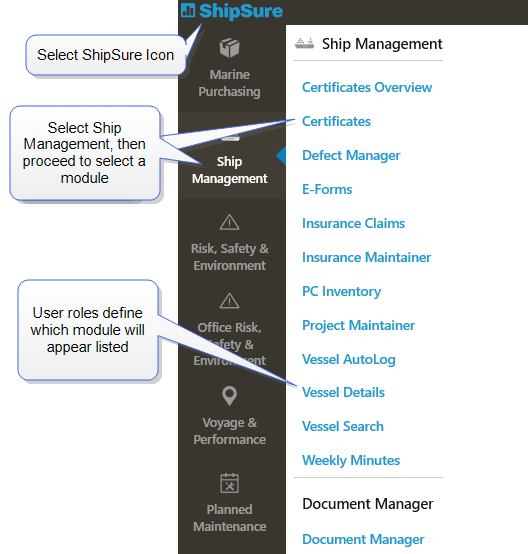
User roles define which modules appear listed in the Blue Banner
Selecting a vessel or a fleet can be done in the following ways throughout the application
- Clicking on the
 icon or to reveal the vessel and fleet listing
 - Typing the Vessel name or Coy ID into the Search field

- or select the vessel from the Favourites, Fleets or Offices vessel listings
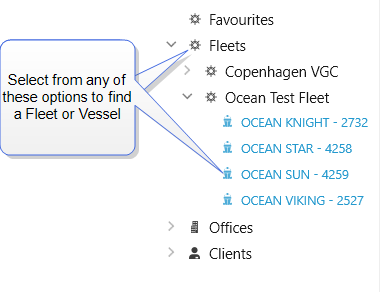
- By clicking on the icon again this will remove the vessel selection listing.
- Certificates
- Defect Manager
- Insurance Claims
- Insurance Maintainer
- PC Inventory
- Project Maintainer
- Vessel AutoLog
- Vessel Details
- Vessel Search
- E-Forms
- Weekly Minutes
- Document Manager
-